Why do we use Python? JavaScript? Java? Dart? Any first-year CS student can tell you these languages are slow compared to languages like C. If we want our software to run as fast as possible, why do we use these languages at all when we could just use C++ for everything?
The answer is simple: ease of use. These languages are very easy to use, their syntax is simple, they read almost like English, they’re usually portable, and, most importantly, they’re garbage collected.
Garbage collected means the coder doesn’t have to think about memory. They can (ironically) forget about it entirely. If I write a program that uses 100 kilobytes, I don’t need to free that 100 kilobytes myself, because I know my language’s runtime will save me and free that memory at some point on its own.
It wasn’t always like this. Most coders in the past had to use manual memory management. You’d tell the computer: I’m going to make an object. This object, all together, is 100 kilobytes. The computer’s only job is to hand you back that memory so you can put your data in it. It’s not the computer’s job to free that memory later, that’s on you.
For this article, I’ll assume you already have some idea of what the heap, the stack, and malloc/free are.
Stack Based Allocations
When you first learn to program, you learn there are two ways to allocate memory: on the stack or on the heap. You probably learned that the stack is faster because memory sits contiguously, while the heap is slower because memory is scattered around. And that you use the heap when you don’t know ahead of time how big an object needs to be, that’s when you reach for dynamic memory. That’s not entirely accurate, you can easily use the stack for dynamic memory too as we’ll later see.
Take a look at the code below:
def three():
    e = 3
    f = 3
    g = 3


def two():
    b = 2
    c = 2


def one():
    a = 1
    two()

def main():
    one()

if __name__ == "__main__":
    main()
If we look at Python’s bytecode for this on Godbolt, and focus on three, we get this:
Disassembly of <code object three at 0x5676616f8980, file "example.py", line 1>:
  1           RESUME                   0

  2           LOAD_SMALL_INT           3
              STORE_FAST               0 (e)

  3           LOAD_SMALL_INT           3
              STORE_FAST               1 (f)

  4           LOAD_SMALL_INT           3
              STORE_FAST               2 (g)
              LOAD_CONST               1 (None)
              RETURN_VALUE
Notice there are 3 stores (allocations) but no deallocation at all. That’s because the whole stack frame gets torn down at once, and that counts as your deallocation.
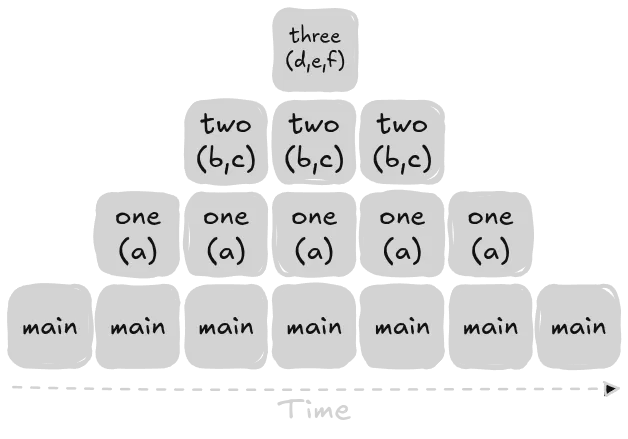
All the variables we create get wiped out together, because the entire stack frame gets torn down together.
So here’s a question: why don’t we just use the stack for everything? The stack is extremely efficient. It does a single allocation per object, and a single deallocation for all the objects at once, once the stack frame’s lifetime ends.
The whole point isn’t really that we don’t want dynamic memory, dynamic memory is actually possible on the stack, through a C stdlib API called alloca. What we actually want is for our memory to outlive the stack frame. We don’t want the memory we allocate to disappear the moment the function call ends.
Heap Based Allocations
On the other side, we have the heap. The usual way to allocate on the heap is through the C API malloc and free.
Their API isn’t hard to understand, and the point of this article isn’t to teach you malloc and free, it’s to teach you advanced memory allocation techniques.
The idea behind malloc and free is simple. Need memory? Ask for it with malloc. Don’t need it anymore? Free it with free. If you’re disciplined about this pattern, your program can never leak memory.
This paradigm is nice. Every malloc should be paired with a free. But in practice, it’s not always this simple.
Manual Memory Management: Problems
Our friends in cybersecurity know that a big part of their field exists just to find code that misuses malloc and free. Things like freeing memory twice (a double free), which can end up letting you write to memory that’s now been reallocated for something else entirely without you even realizing it. Or malloc-ing a buffer that’s smaller than the data you’re about to put in it, so you write past the buffer’s bounds and corrupt whatever memory is next to it. So you really have to be careful when using this API.
Even so, every free still has to search for the right chunk of space, update its internal metadata, and deal with issues like fragmentation. In other words, even without a syscall, it’s still not a free operation.
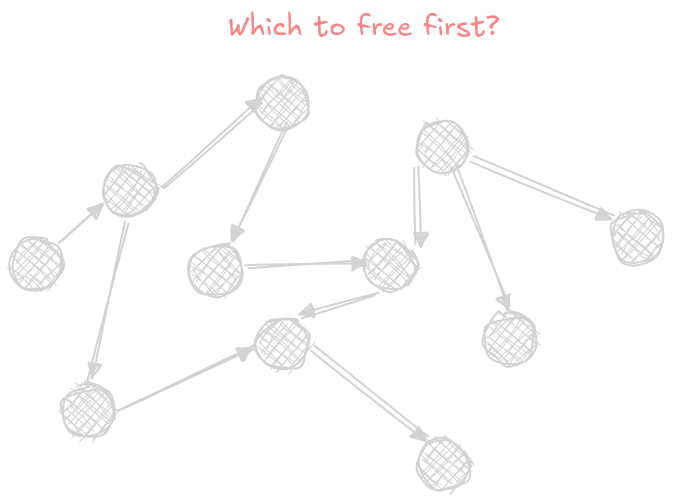
The fact that the operation can be somewhat expensive isn’t the only downside of this paradigm. If you have a graph made entirely of objects, figuring out which node to free first can be genuinely hard, especially if the graph is cyclic.
Even if you use the API perfectly, there’s still a cost you pay. The allocator might need to request fresh memory from the OS, which tends to be expensive since it usually involves a system call. But most modern allocators don’t make a syscall for every single malloc. Instead, they request one big chunk of memory upfront, and then divide it up themselves across the smaller allocations your program asks for.
300,000 Rats
Imagine you’re building a game. Something like A Plague Tale: Requiem. It can have more than 300,000 rats on screen at once. Setting aside how hard that already is to render on the GPU, the CPU still needs to track each object individually for the rat’s own logic. In reality, not every rat is its own object (there’s merging involved most definitely) but let’s assume that in our hypothetical game, every rat has to be its own object.
How would we create these objects? If we did 300,000 allocations one by one, we’d literally never finish in time. Now imagine there’s also an ability in the game that lets you kill every enemy on screen at once. When you kill them, they all disappear. Are we going to do 300,000 calls to free?
The better solution here: since these enemies are spawned all at once, and disappear all at once too, we should do a single allocation for all the enemies, and a single deallocation for all of them as well. Because these enemies’ entire lifespans are tied together. Their lifetimes are linked.
Lifetimes
Anyone who’s learned Rust probably just got PTSD flashbacks seeing that subtitle. We won’t go too deep into lifetimes since they’re a complicated topic, but let’s talk about them at a high level.
Put simply: an object’s lifetime is the span of time during which that object is considered valid and usable.
For example, I can’t use a_1 or a_2 after their scope (the closing bracket) ends.
{
    let a_1 = 1;
    let a_2 = 2;
}
Like this:
{
    let a_1 = 1;
    let a_2 = 2;
}

// Invalid.
console.log(a_1);
Setting aside JavaScript’s own scoping quirks, this concept exists in pretty much every programming language today.
If we want to create a new lifetime, we start a new scope. So we can track our lifetimes, let’s name them say, a and b.
// lifetime a start
{
    let a_1 = 1;
    let a_2 = 2;
}
// lifetime a end

// lifetime b start
{
    let b_1 = 1;
    let b_2 = 2;
}
// lifetime b end
Notice something? The two numbers inside each scope are tied to each other. Their lifetimes are linked. The moment both numbers go out of scope, we can discard them all at once, since neither one will outlive the other anyway. If one of the two numbers reaches the end of its lifetime, the other one necessarily has to end its lifetime too, because they were both created in the same scope.
The stack works exactly this way, as we saw earlier. Every variable inside a stack frame has its lifetime tied to the lifetime of the frame itself.
Here’s what we actually want: we want a way to tie the lifetimes of our objects together, the same way the stack does, avoid the headaches of malloc and free, and still decide for ourselves exactly when that lifetime ends.
The Arena Allocator
The solution to our problem is arena allocation. The whole idea is that you start by doing a single malloc for one big buffer, and then you use that region to add your objects into. The objects can be of any type, and any size. And when you’re done with the arena, you just reset that memory in one go.
There are many techniques for building arenas, we’ll implement the most well-known kind, called a bump allocator. We’ll use C.
The Arena Struct
This is the first thing we’ll build. All we need inside our struct is a buffer to hold our data, and we need to know the size of that buffer.
#include <stddef.h>

typedef struct Arena {
    unsigned char* buffer;
    size_t buffer_size;
} Arena;

int main(int argc, char* argv[]) {
    return 0;
}
To create an arena, we need a function. We’ll call it Arena_malloc, and it’ll return a pointer to the struct we’re creating.
Arena* Arena_malloc(size_t buffer_size) {
    // One malloc to create the struct.
    Arena* arena = malloc(sizeof(Arena));
    arena->buffer_size = buffer_size;

    // Another malloc to create the buffer.
    arena->buffer = malloc(buffer_size);
    return arena;
}
Now, if we want to create a new arena, this is all it takes:
int main(int argc, char* argv[]) {
    Arena* a = Arena_malloc(1024);
}
This creates a buffer that’s 1024 bytes in size.
Right now, the buffer looks like this:

Arena Allocation
Now, how do we actually use our arena?
We’ll write another function called Arena_allocate. All this function does is take a size parameter, and with that size, it places the memory we need into the buffer we’ve created.
If, say, we go and allocate a struct called Player that’s 120 bytes, the buffer would end up looking like this:

Now we need something that tells us how full our buffer currently is. We’ll add a buffer_offset field to the Arena struct.
typedef struct Arena {
    ...
    size_t buffer_offset;
} Arena;
CPU Alignment
Now, there’s one more thing we need to learn: CPU alignment.
CPUs like to read memory in a specific way. If you have an int (usually 4 bytes), the address of its first byte needs to be an address divisible by 4.
So if we picture our memory as addresses running from 0 to 1024, and we’ve used up to address 493, then the next address where we’re allowed to place our int is 496, since that’s the nearest address divisible by 4.
So what happens with the 3 addresses right after 493? We need to fill them with something, we fill them with what’s called padding.

So how do we calculate the alignment of our data types? You might think that since a data type’s address needs to be divisible by its size, we could just use sizeof.
Unfortunately, it’s not quite that simple. Imagine you have something like this:
struct Player {
    char x;
    int y;
};
And our memory ends up looking like this:
0    x
1    padding
2    padding
3    padding
4    y
5    y
7    y
8    y
sizeof on this struct gives us 8. But in reality, we need this struct’s address to start on an address divisible by 4.
The general rule of thumb for alignment is that a struct’s alignment equals the size of the largest data type inside it, in this case, the largest data type is the int, so the alignment is 4, meaning this struct needs to start on an address divisible by 4.
Back to allocation. To allocate inside our buffer, we need to know both the size of the struct we’re allocating and its alignment, so we know exactly which address to place it at within our buffer.
void* Arena_allocate(Arena* a, size_t struct_size, size_t struct_alignment) {
    ...
}
We need a better way to visualize our buffer. Our buffer doesn’t exist in memory all by itself.
If, say, our memory is 4096 bytes total, and the buffer itself is 1024 bytes, it might look something like this:

So, what do we actually need to do to allocate? We need to start from the very beginning of the buffer’s address, add the offset (how much of the buffer is already used), and also add padding, so the struct ends up properly aligned.
The first thing we need to do is figure out, starting from the offset, how much we need to add to become aligned. Say our offset is 5, and the alignment is 4, we calculate 5 % 4 = 1. That means our current offset is 1 byte past the correct alignment. So, to reach the next valid alignment, we need to subtract that result from the alignment itself: 4 - 1 = 3. That means we need to add 3 bytes to our current offset to land on the correct address.
But what happens if you’re already at a valid alignment? Say the offset is 8, and the alignment is 4. You’d calculate 8 % 4 = 0, and subtract that from the alignment, giving you 4, but that’s wrong. That’s why, at the very end, we need to take the mod of our result one more time: 4 % 4 = 0. And that’s our correct answer.
The code ends up looking like this:
void* Arena_allocate(Arena* a, size_t struct_size, size_t struct_alignment) {
    size_t padding =
        (struct_alignment - (a->buffer_offset % struct_alignment)) %
        struct_alignment;

}
This gives us the padding needed to make the address aligned.
Arena Allocation: Continued
We want to make sure our struct will actually fit inside our arena. We check whether our offset plus the padding plus the struct’s own size is less than the arena’s total size.
We’ll write this line:
if (a->buffer_offset + padding + struct_size > a->buffer_size) {
    return NULL;
}
To calculate the address, we do some pointer arithmetic. We add the padding to the address of the buffer’s pointer. We also add the current offset, which tells us how much of the buffer we’ve already used.
void* placement_address = a->buffer + a->buffer_offset + padding;Then, we add the padding we just calculated to our offset, plus the size of the struct we’re adding.
a->buffer_offset += padding + struct_size;Finally, we return our address.
return placement_address;And here’s the complete implementation of the allocation function:
void* Arena_allocate(Arena* a, size_t struct_size, size_t struct_alignment) {
    size_t padding =
        (struct_alignment - (a->buffer_offset % struct_alignment)) %
        struct_alignment;

    if (a->buffer_offset + padding + struct_size > a->buffer_size) {
        return NULL;
    }

    void* placement_address = a->buffer + a->buffer_offset + padding;

    a->buffer_offset += padding + struct_size;

    return placement_address;
}
That’s it. That’s the whole implementation of our allocator.
Reset & Free
What do we do if we want to reuse our arena for something else? We’ll write another function called Arena_reset. You’d probably expect this implementation to be complicated, but it’s not. Here’s the whole thing:
void Arena_reset(Arena* a) {
    a->buffer_offset = 0;
}
Think about it this way: if we reset our offset back to zero, what happens? The next time we allocate, we’ll simply write over whatever data used to be there. You could think of it as treating our old data as garbage values, and just writing right over it.
That said, we still haven’t freed the buffer’s memory itself. We need a function for that too.
void Arena_free(Arena* a) {
    // Free the buffer owned by the arena first
    free(a->buffer);
    // Free the arena struct itself
    free(a);
    // `a` is now dangling.
}
Arena Usage
Now for the fun part, how do we actually use our arena? Imagine we’re building a game. On every frame of the game, we need to allocate some ammo, say, some bullets.
The first thing we’ll do is create a struct called Bullet.
typedef struct Bullet {
    float x, y;
} Bullet;
If we wanted to allocate one, we’d do something like this:
int main(int argc, char* argv[]) {
    Arena* a = Arena_malloc(1024);

    Bullet* b = (Bullet*)Arena_allocate(a, sizeof(Bullet), _Alignof(Bullet));

    b->x = 10.0;

    return 0;
}
The odd-looking thing in this code is _Alignof. It gives us the alignment of any type.
We start by creating our arena, and Arena_allocate gives us back an address inside the buffer as a void*. All we need to do is cast that address to a pointer of our own type. What that’s really saying is: “I don’t want to treat this address as raw bytes anymore, this address is meant to hold the bytes of a Bullet struct.”
After that, we write the data we want into that address. In this case, we set x to 10.0.
Writing this code out is a bit annoying, so we can make a macro to make it easier to write.
#define ARENA_ALLOCATE(arena, Type)                                            \
    ((Type*)Arena_allocate((arena), sizeof(Type), _Alignof(Type)))

int main(int argc, char* argv[]) {
    Arena* a = Arena_malloc(1024);

    Bullet* b = ARENA_ALLOCATE(a, Bullet);

    b->x = 10.0;

    return 0;
}
Now let’s write our game loop.
int main(void) {
    Arena* a = Arena_malloc(MAX_BULLETS * sizeof(Bullet) + 64);

    // so gcc doesn't optimize this out.
    volatile float sink = 0;

    for (int frame = 0; frame < FRAME_COUNT; frame++) {
        int bullet_count = (frame % MAX_BULLETS) + 1;

        Bullet* bullets = (Bullet*)Arena_allocate(
            a, sizeof(Bullet) * bullet_count, _Alignof(Bullet));

        for (int i = 0; i < bullet_count; i++) {
            bullets[i].x = i * 10.0f;
            bullets[i].y = frame * 5.0f;
        }

        sink += bullets[bullet_count - 1].x;

        Arena_reset(a);
    }

    printf("done, sink = %f\n", sink);
    Arena_free(a);
    return 0;
}
We create a single arena before the loop starts. On every frame, we allocate the bullets specific to that frame, use them, and then reset the arena at the end of the loop.
Then, we reuse that same arena on the next frame.
Benchmark: Arena vs malloc
Now, let’s compare our allocator against malloc. This is the exact same version, but using malloc instead.
#include <stddef.h>
#include <stdio.h>
#include <stdlib.h>

typedef struct Bullet {
    float x, y;
} Bullet;

#define FRAME_COUNT 2000000
#define MAX_BULLETS 50

int main(void) {
    // same thing
    volatile float sink = 0;

    for (int frame = 0; frame < FRAME_COUNT; frame++) {
        int bullet_count = (frame % MAX_BULLETS) + 1;

        Bullet* bullets = (Bullet*)malloc(sizeof(Bullet) * bullet_count);

        for (int i = 0; i < bullet_count; i++) {
            bullets[i].x = i * 10.0f;
            bullets[i].y = frame * 5.0f;
        }

        sink += bullets[bullet_count - 1].x;

        free(bullets);
    }

    printf("done, sink = %f\n", sink);
    return 0;
}
We’ll use hyperfine to compare the two.
Here are the compile commands we’ll use:
gcc -O2 -std=c11 -o arena_bin arena.cgcc -O2 -std=c11 -o malloc_bin malloc.cAnd the run command:
hyperfine --warmup 3 ./malloc_bin ./arena_binHere are our results:
Benchmark 1: ./malloc_bin
  Time (mean ± σ):      19.0 ms ±   1.9 ms    [User: 18.6 ms, System: 0.5 ms]
  Range (min … max):    17.9 ms …  36.8 ms    141 runs


Benchmark 2: ./arena_bin
  Time (mean ± σ):      10.0 ms ±   0.3 ms    [User: 9.7 ms, System: 0.5 ms]
  Range (min … max):     9.5 ms …  12.0 ms    244 runs

Summary
  ./arena_bin ran
    1.90 ± 0.20 times faster than ./malloc_bin
Credits
This article wouldn’t have been possible without this fantastic talk by Ryan Fleury.
This C++ implementation was also extremely helpful.